
Beegle now records the client’s cash flow
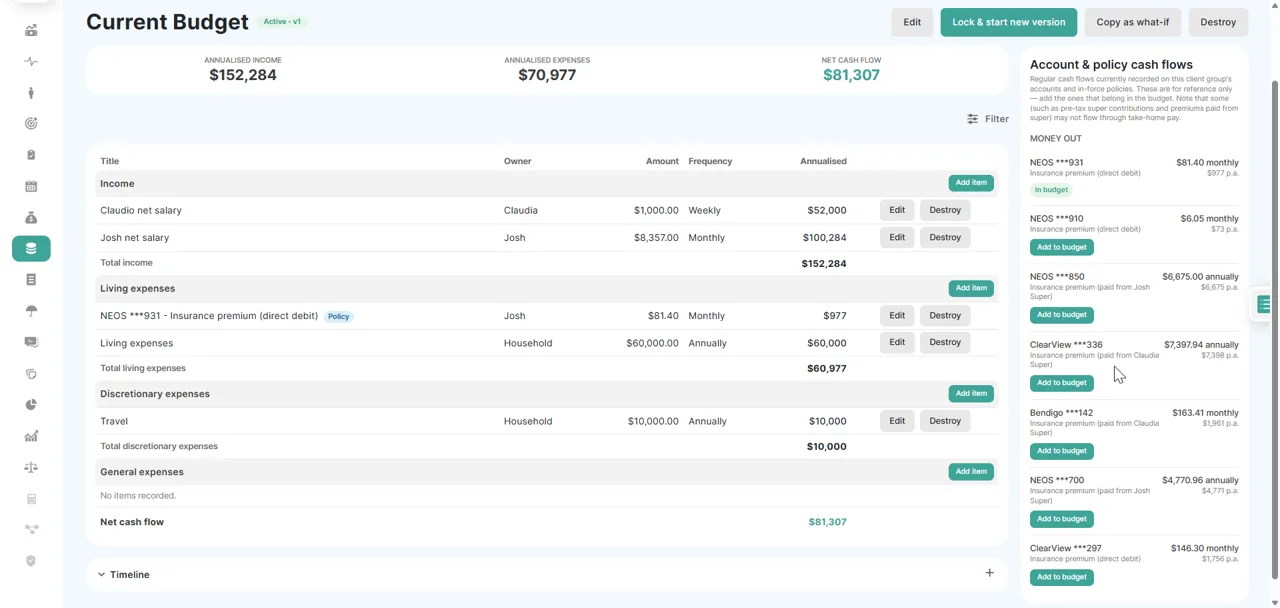
Cash flow is live in Beegle. Every client group can now hold a budget — income, living costs, discretionary spending, and the outgoings that belong to an entity rather than a household — annualised, attributed to whoever it belongs to, and kept as a version you can lock.
Until now that information has lived in the planning CRM running alongside Beegle, which is one of the reasons the older system stays open. It now has a place here too: in the client group’s navigation, directly under Accounts.
Many of the figures are already in Beegle
Alongside the budget sits a panel listing the regular cash flows already recorded on that client group’s accounts and in-force policies: super and investment contributions, regular withdrawals, loan repayments, annuity payments, rental income and property expenses, and the premium on every policy still being charged. It is there so nobody retypes figures the file already holds.
Add to budget copies a row across with its amount, frequency, category and ownership already filled in, and you correct whatever needs correcting. Ownership of a premium follows whoever pays it rather than whoever owns the policy; an entity’s outgoings land in their own category rather than among household living costs. The rest — groceries, school fees, the things no account records — is typed once and then it is on the file.
The figures hold still
The obvious way to build this is to derive the budget from the accounts, so it is always current. We deliberately did not. A budget is a statement about a moment: if a client lifts their contribution in July, the budget you built in March should not quietly become a different budget. The advice was given on March’s figures, and in three years’ time March’s figures are what need to be on the file.
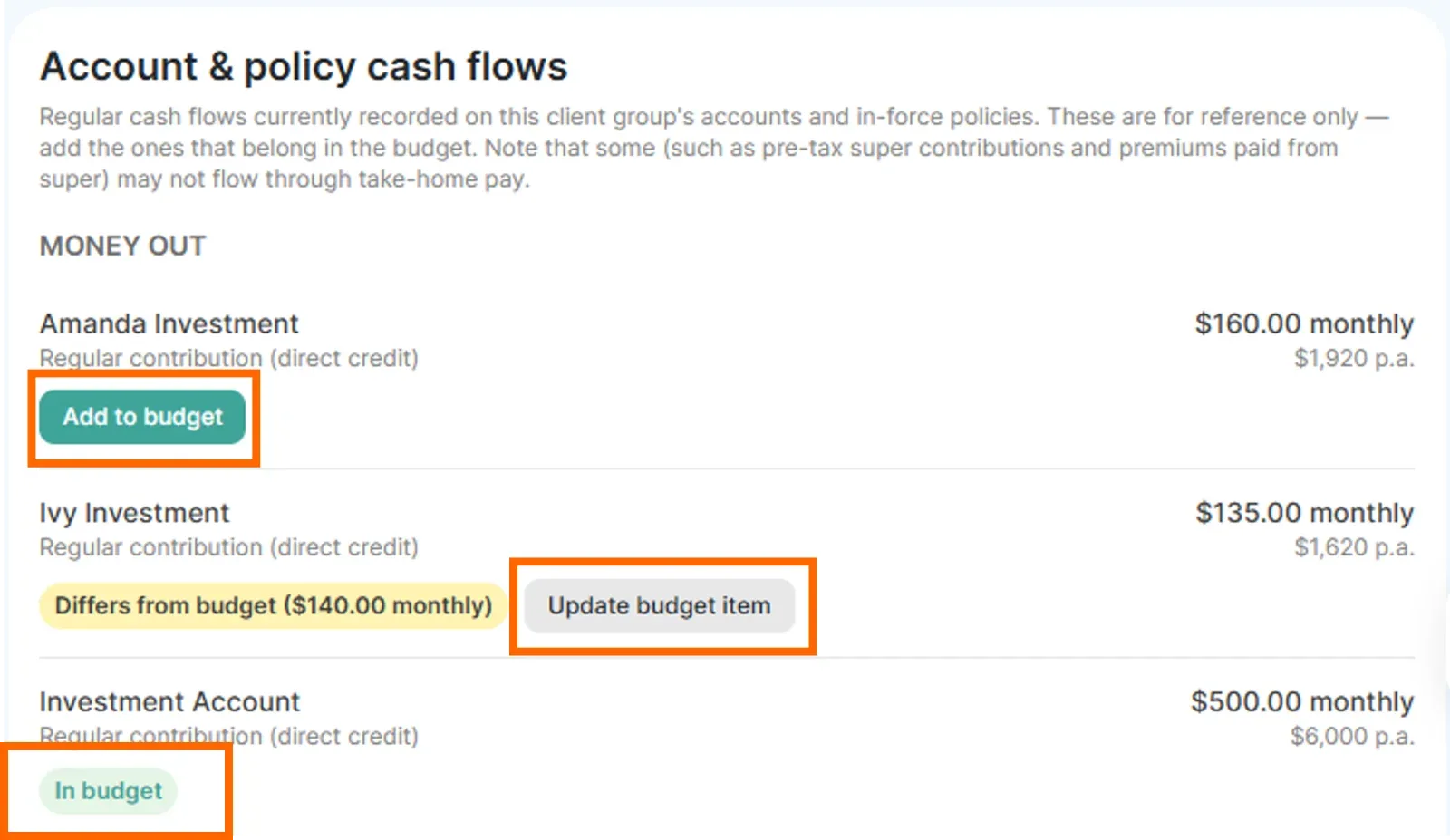
So every row stores its own amount, and the link back to the account or policy is kept as a reference rather than a feed. When the two drift apart, the panel says so: the row is marked Differs from budget, alongside what the record now says. One click takes the new figure, if you want it.
The drift is information in its own right. A client who agreed in March to increase their contributions, against an account that still shows the old amount, is a conversation — and it is on the screen rather than waiting for someone to think to check.
Lock & start new version then turns a budget into a fixed snapshot and opens the next one with everything carried across. Open the locked one a year later and it reads exactly as it did, while the panel beside it stays live and tells you what has moved since.
What-ifs, and the insurance conversation
Copy as what-if takes a full editable copy of any budget, labelled with the version it came from and carrying no version number of its own. The real budget is untouched, and several scenarios can sit side by side in the client group.
The case we built it for is insurance. Take the household’s real budget, copy it, remove one income and other items that no longer apply in the scenario. The resulting net cash flow becomes the rationale behind your insurance recommendations. To enhance this audit trail even further, this What if scenario can be linked to a insurance review task so the two are permanantly associated.
Then do it again for the other person, and again for death rather than disability, where one set of living costs falls away and another does not.
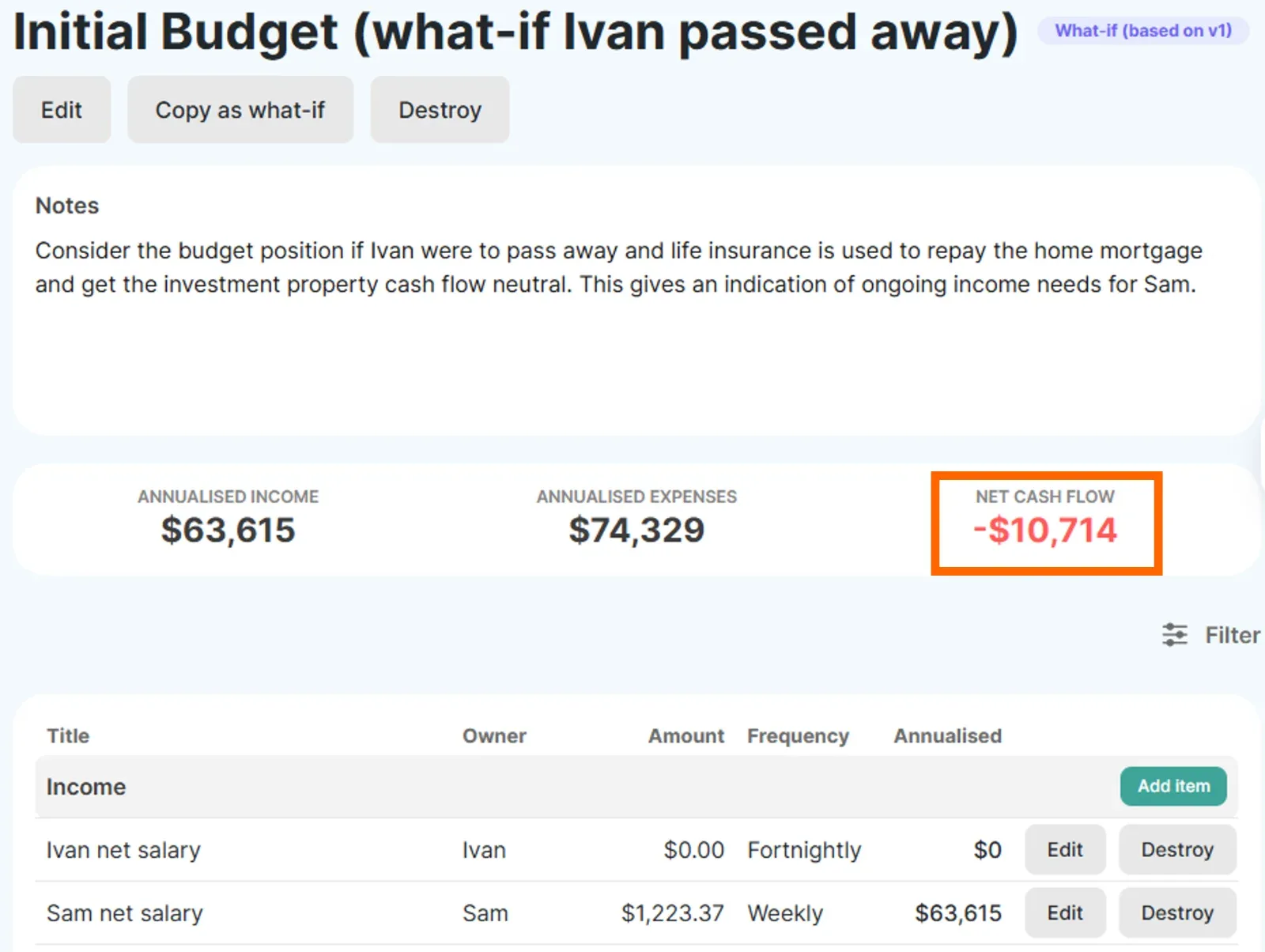
The scenario stays in the client group afterwards, labelled and dated, as the working behind the recommendation.
On the record, like everything else
In June we released timelines and commentary, and in August tasks that sit on the records they concern. A budget is one of those records. Tasks link to it, the adviser’s judgement about it is recorded against it, file notes that touch it appear on its timeline, and the budget’s own notes carry the assumptions behind the figures — gross or net, what was excluded, whose numbers these are.
Why did we plan on $4,000 a month of living costs? Three years later the locked version, its assumptions, the file note from the meeting and the reasoning are on one page: the page you already had open.
Available now, and what follows
Cash Flow is live today. Open any client group and it sits in the navigation directly under Accounts.
More of the fact find and CRM fields will follow shortly. Each release takes away another reason to keep two systems open and to retype between them, and moves Beegle further towards being the software a planning business runs on rather than one of the tools it keeps alongside others.
To learn more, book a demo