
Tasks now sit on the record they belong to
Task management is now live in Beegle. It sorts out the clutter of a busy task list — but the more significant change is what it does to your records. Every account, policy, goal and person in Beegle now carries the tasks done on it alongside the comments, judgements and file notes already there.
First, the clutter
Every practice already has a task list, and the problem is rarely that things go unrecorded. The problem is that a flat list of sixty open items tells nobody which four they can pick up this morning. Most of the list is waiting on something — a signed authority, a rollover to land, a fund to respond, an earlier step nobody has finished.
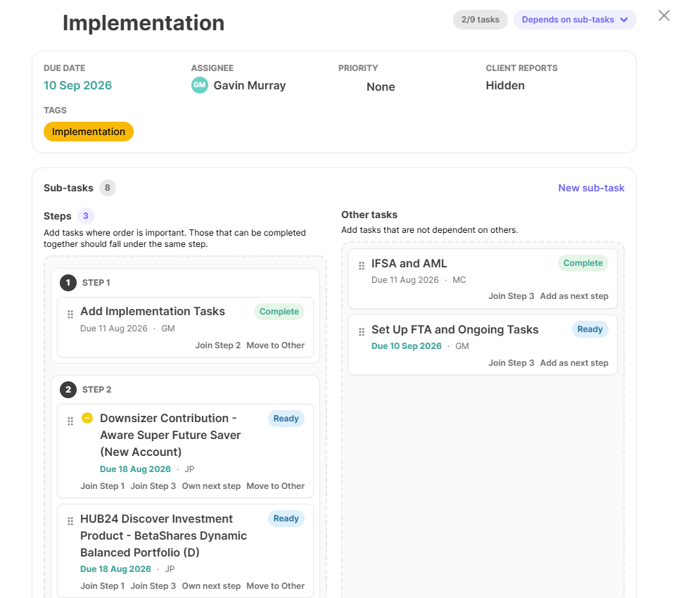
Tasks in Beegle can have sub-tasks, up to five levels deep, and those sub-tasks can be put in order. Beegle then works out the consequence: anything still waiting on an earlier step is marked Waiting, and anything genuinely free to start is marked Ready. Filter to Ready and the sixty-item list becomes the handful your team can act on. Complete a step and whatever it was blocking releases itself.
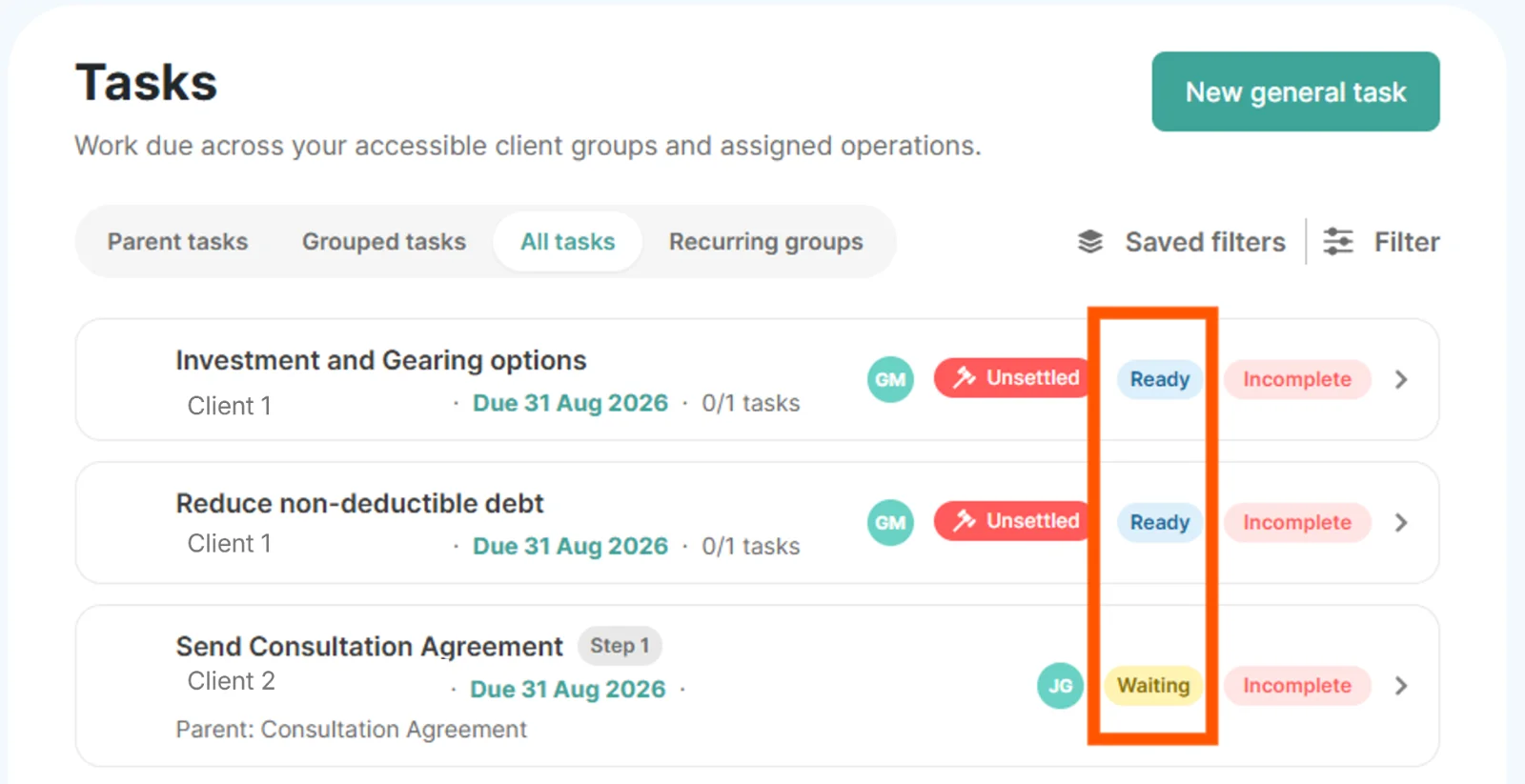
Some systems already do a version of this, generating the next task as each one is ticked off. In our experience they buy that at two costs. You lose the big picture — you can see the task in front of you but not the shape of the whole engagement, or how far through it you are. And once a client is attached to a template flow, it sets: you cannot amend the template without disturbing the clients on it, and you cannot amend the client's tasks to suit a client who does not fit the standard path.
Beegle works the other way around. The whole tree is visible, with progress showing at every level, so the big picture and the next action are the same screen. Templates are a starting point rather than a contract — apply one to a client group, review the tasks before anything is created, and edit freely afterwards. Changing a client's tasks never touches the template, and changing the template never reaches back into work already underway.
It covers the whole practice, too, not just implementation after a meeting: review preparation, compliance work a client never sees, tasks deliberately scheduled for two years out, and internal business tasks with no client attached at all. One queue, filtered by assignee, priority, due date, status, tag and readiness, with the filter combinations you use daily saved as your own named views.
Now the part that changes how the practice works
In June we released timelines and commentary, which gave almost every record in Beegle a history: the comments made about it, the adviser's judgement at the time, and the file notes that touched it. Tasks were the missing piece, and they are now on that timeline too.
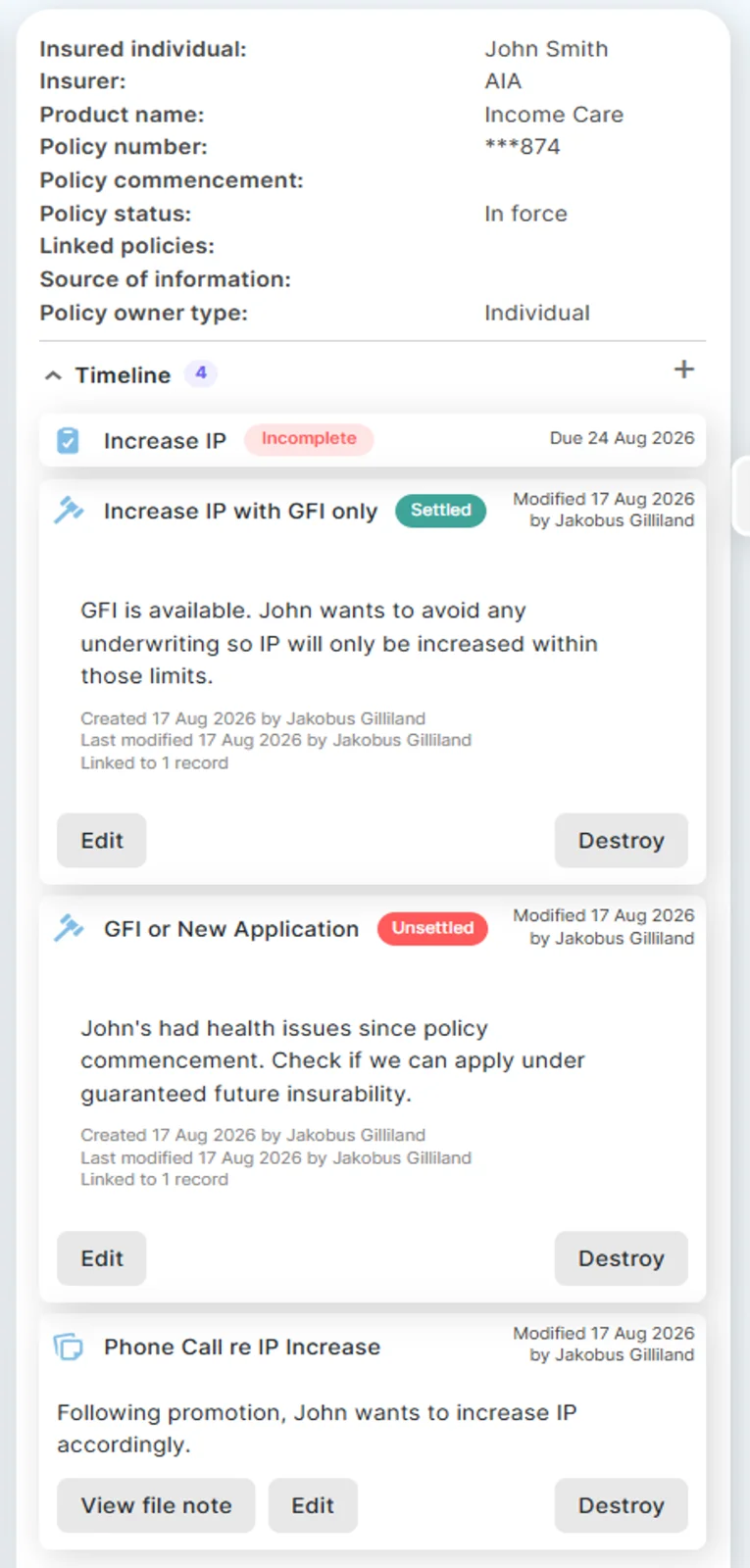
A task can be linked to the records it actually concerns — a goal, a key date, an account, a policy, an insurance need, a person, an entity — and to more than one at once. Once linked, it appears on each of those records' timelines, alongside everything else recorded there.
Open a policy in three years' time and you do not find a policy record. You find what was done to it and why: the task to replace it, when it was raised, who it was assigned to, when it completed, the file note from the meeting where it came up, the comment explaining the client's hesitation, and the adviser's judgement about why the replacement went ahead. In sequence, in one place, on the record you already had open.
That is the case we keep coming back to, because it is the one that costs practices real time. A file gets audited and someone has to reconstruct the reasoning. An adviser leaves and their successor inherits a client whose history lives in a departed colleague's memory. A client asks why you did that, four years later, and the honest answer takes half a day to assemble from advice documents, emails and file notes.
None of that requires searching. There is no retrieval step, no query to phrase, no AI agent to wait on and then second-guess. The history is on the record because that is where it was written, and the record is what you had open anyway.
Work you set aside, and work that repeats
Some tasks cannot progress and will not for a while - you are waiting on a fund, the client is travelling, a decision is deferred to next quarter. Deleting the task loses the history; leaving it in the queue teaches everyone to ignore the queue.
Instead, set the task aside with a reason and a date to bring it back. It leaves the working queue, drops off client reports while inactive, and returns on the chosen date. The setting aside and the return are both recorded on the timeline, so a gap in a file explains itself.
Recurring obligations — annual reviews, insurance checks, quarterly compliance — run as a series where each occurrence is a real task with its own sub-tasks and its own history. Amending this year's process does not rewrite last year's record, and you advance the series when you are ready rather than on a schedule that fires whether or not the last one finished.
What the client sees is your decision
Each task carries a switch for whether it appears on client reports. Implementation steps the client should be tracking can show on their wealth statement; internal compliance work stays internal. The full history stays on the record either way.
Available now
Task management is live in your account today. It is an add-on, billed separately from client groups and data storage, at $0.50 per month including GST for each client group with tasks, less two complimentary client groups.
The task list is the part you will notice first. The record that explains itself four years later is the part that changes how the practice runs.
To learn more, book a demo